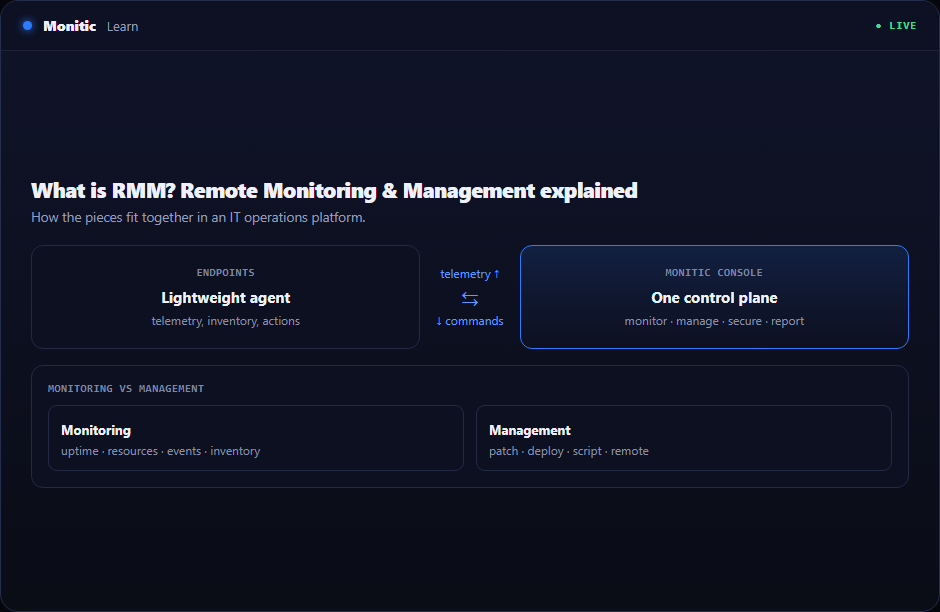
What does RMM software do?
At its core, an RMM platform answers two questions continuously: what is the state of every device I'm responsible for? and how do I fix it without walking to the machine? It collects hardware and software inventory, tracks performance metrics (CPU, memory, disk, services), raises alerts when thresholds are crossed, and provides the tooling to act — deploying patches, running scripts, restarting services, or opening a remote desktop session.
RMM emerged from the managed service provider (MSP) world, where one technician may be responsible for thousands of devices across dozens of client networks. Today the same model is standard for internal IT departments managing distributed and hybrid workforces.
How does RMM work?
The agent model
Almost all modern RMM tools install a small software agent on each managed endpoint. The agent runs as a background service, collects telemetry, and maintains an outbound connection to the RMM server — which means it works through firewalls and NAT without inbound ports. Because the agent initiates the connection, devices stay manageable whether they sit in the office, at home, or on hotel Wi-Fi.
Agent quality matters more than most buyers expect. A heavy agent that consumes CPU or conflicts with security software creates the very tickets it was meant to prevent.
Monitoring vs management
The two halves of the acronym are distinct capabilities:
- Monitoring is passive observation: uptime, resource usage, event logs, service states, hardware changes, installed software. Good monitoring detects a failing disk or a stopped backup service before a user notices.
- Management is active control: pushing patches, deploying software, executing scripts, enforcing configuration policies, and taking remote control of a session. Management turns an alert into a resolution.
A tool that only monitors is an observability product; a tool that only manages is a deployment product. RMM is the combination — see a problem, fix the problem, same console.
Alerting and automated remediation
RMM platforms let you define alert rules — thresholds, durations, and severities — so that noise is filtered and real problems escalate. Mature platforms go further: an alert can trigger an automation (restart the service, clear the temp directory, re-run the failed job) so routine issues resolve themselves and only exceptions reach a human.
Benefits of RMM
- Fewer site visits and truck rolls. Most issues are resolved remotely, often before the user reports them.
- Proactive instead of reactive IT. Failing hardware, expiring certificates, and full disks are caught early.
- Consistency at scale. Policies, patches, and scripts apply to hundreds of machines identically.
- A single source of truth. Inventory, health, and history live in one place — which also feeds IT asset management and audit reporting.
- Faster onboarding. New devices enroll automatically and receive baseline configuration without manual setup.
RMM and patch management
Patching is the highest-value workload that runs on top of RMM infrastructure. The agent already knows what software each device runs and can execute installs, so an RMM platform is the natural delivery mechanism for OS and third-party updates. Many teams evaluate RMM primarily on the strength of its patching engine — read our companion guide on what patch management is for how the patch lifecycle works in detail.
RMM for internal IT vs MSPs
The same technology serves two audiences with different needs:
- Internal IT teams care about deep integration with their own stack: directory services, the ticketing system, security tooling, and compliance reporting for a single organization.
- MSPs need strict multi-tenancy — hard separation between client environments, per-client policies and branding, technician access scoping, and per-endpoint billing that maps to how they charge customers.
If a platform was built only for one of these audiences, the other will feel the friction, so verify the vendor supports your operating model natively.
How to choose an RMM platform
Key evaluation criteria:
- Agent footprint and stability. Test CPU, memory, and update behavior on your real device mix — including low-spec hardware.
- Multi-tenancy and access control. Even internal teams benefit from scoping technicians to specific sites or departments; MSPs cannot operate without it.
- Built-in remote access. A native remote desktop tool avoids paying for and deploying a separate product, and keeps session logs in one audit trail.
- Automation depth. Scripting, scheduled tasks, and alert-triggered remediation determine how much manual work the tool actually removes.
- Pricing model. Per-endpoint pricing is the norm; watch for per-technician fees, remote-access surcharges, and paid add-ons that inflate the real cost.
- Breadth of the platform. Standalone RMM increasingly loses ground to unified platforms that include ticketing, patching, and security in one agent and one console.
RMM vs ITSM vs ITAM
These categories overlap and increasingly converge. RMM manages the devices; ITSM manages the work — tickets, requests, and changes; ITAM manages the records — what you own, where it is, and what it costs. The strongest operational gains come when the three share data: a ticket that already shows the device's health, or an asset record updated in real time by the agent.
See how Monitic does RMM → Monitic Endpoint Management
Frequently asked questions
Is RMM only for MSPs?
No. RMM originated with MSPs, but internal IT departments now use the same tooling to manage distributed workforces. The difference is configuration: MSPs lean on multi-tenancy and per-client billing, while internal teams lean on integration with their own directory, ticketing, and security stack.
What is the difference between RMM and MDM?
RMM focuses on full management of desktops, laptops, and servers via a persistent agent. MDM (mobile device management) uses OS-level enrollment frameworks to manage phones and tablets with a lighter policy model. Many unified platforms now cover both from one console.
Does RMM replace antivirus or EDR?
No. RMM is an operations tool, not a security control. It complements security tooling by keeping systems patched, monitoring for anomalies, and often deploying and monitoring the EDR agent itself — but it does not detect or block malware on its own.
How is RMM priced?
Most vendors price per managed endpoint per month, often tiered by feature set. Evaluate the total cost including remote access, patching, and automation — some vendors sell these as separate add-ons, which changes the comparison significantly.